Q&A search use-case | with a long-term memory
Generative AI is the trend these days and increasingly getting more attention than one could have imagined 🫢. This could be a pivot point of how the human-machine interaction has been so far.
One such application of generative AI is Long-Term Memory Question Answering (LTM-QA), which allows machines to store information for an extended period and recall it as needed.
Information Retrieval (IR) systems such as Google, Netflix, and Amazon have significantly increased the accuracy and relevancy of search experiences and recommendation models. However, combining IR with LTM-QA can lead to even more impressive results. Imagine a search engine that not only retrieves relevant information based on your query but also recalls previous conversations and personal preferences to provide more personalized and accurate responses.
The potential applications for LTM-QA are endless, from virtual assistants that can recall previous conversations to educational platforms that can offer personalized learning experiences. Khan Academy has already rolled out an AI assistant named "Khanmigo" which uses LTM-QA technology to assist learners better.

The technology to make this a reality is already available, and this article will explore how ReactiveSearch and ChatGPT can be used to implement LTM-QA for a variety of use cases.
Generative Question-Answering
The most straightforward GQA system requires nothing more than a user text query and a large language model (LLM).

A bit about ReactiveSearch
ReactiveSearch.io provides a supercharged Elasticsearch experience for creating the most demanding app search experiences with a no-code search relevance control plane, UI builder, out-of-the-box search analytics, and low-code UI components.
With ReactiveSearch, you can:
Import your data from various sources via the dashboard or CLI or REST APIs,
Build production-grade search UIs using:
UI component libraries that are available for React, Vue, React Native, Flutter, and vanilla JavaScript,
Get out-of-the-box actionable analytics on top searches, no-result searches, slow queries, and more,
Get improved search performance and throughput with application layer caching,
Build access-controlled search experiences with built-in Basic Auth or JWT-based authentication, read/write access keys with granular ACLs, field level security, IP-based rate limits, and time to live - read more over here.

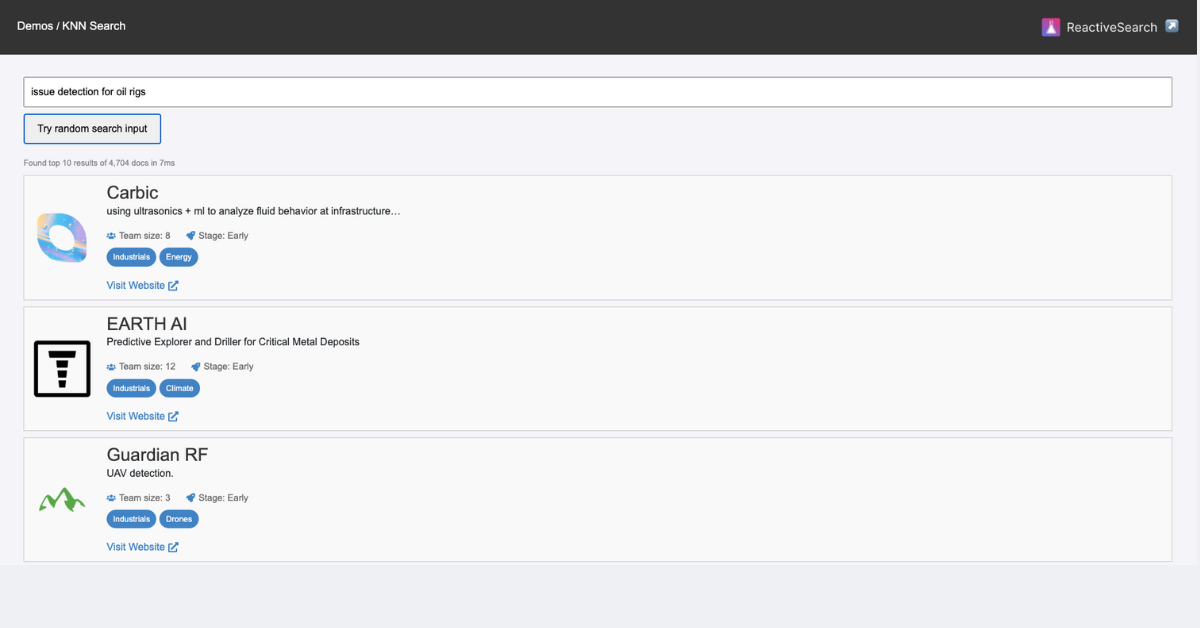
Image: ReactiveSearch overview diagram
With recent upgrades, ReactiveSearch supports all major search engine backends like OpenSearch, Mongo Atlas, Solr, OpenAIetc.
Read more here.
Let's Visualize 👀
The simple idea is to combine the power of ChatGPT and standard search engine tools like ElasticSearch and OpenSearch to finally come up with a powerful search experience that's relevant, accurate, to the point, and evolving as per the users' prompts.
🤔 Elasticsearch and OpenSearch are the standards where developers already have long-term search data, they support both text and vector search.
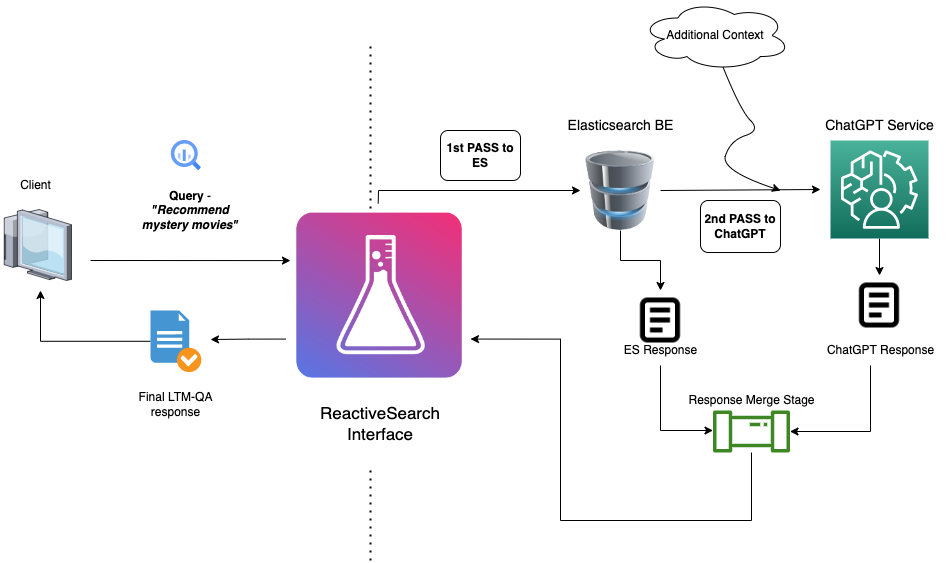
On a context level, the process looks like this -
Have a search experience based on ElasticSearch focusing on retrieving precise and factual answers yielded as a result of long-term memory management.
The user triggers a search query.
The BE receives the request and feeds the query to Elasticsearch and GQA, added with some additional context to the GQA tool(ChatGPT in this case). Finally leaving us with two responses.
The responses from GQA and Elasticsearch BE are merged before finally returning them to the user.
The challenges from the above approach are obvious -
Where do we get a search experience that utilizes elastic search?
How can we intercept the query to make an additional query to ChatGPT?
Moreover, how can we provide additional context and merge the responses from both endpoints?
The answer to all the above challenges is by using ReactiveSearch's Pipelines.
Revisiting the process diagram, This is how the process looks like with ReactiveSearch pipelines -
📄 Check out our docs to know about pipelines here.
Additionally, Read a blog where one of our team members has explained all the tiny pieces of how you can build and enhance a search UI with pipelines.
Let's get building 🏗️
Now that we know the approach to follow, Let's get our hands dirty in building a Q-n-A search app that recommends movies based on the user's prompt and also gives back an intelligent answer to assist better. We shall start by using our basic search app and then add a AIAnswer component that does the above-discussed magic for us.
Building a search UI
With our pipeline configured, it's time to witness it in action. We'll use the React flavor of the ReactiveSearch library to develop the UI. However, you can use the ReactiveSearch dashboard's no-code UI builder, or Vue.JS, vanilla JS, React Native or Flutter libraries to do this. See the choosing UI library section.
npx and go!
We will use create-react-app to get the boilerplate code. Execute the following command in the terminal to create a React app named "feed-search":
npx create-react-app q-n-a-search-ui
cd q-n-a-search-ui
yarn add @appbaseio/reactivesearch
code .   # Fire up your code editor
@appbaseio/reactivesearch is ReactiveSearch's React npm package.
As you open the code editor, notice the src/index.js file, we will be editing this file primarily to build the search UI.
For this demo, You can use the below starter App which is a movie search app query Elasticsearch to retrieve movies based on the users' text queries.
The AIAnswer component
AIAnswer is an AI-driven answer UI component that can interact with a dataset to get context-aware and provide relevant answers based on user inputs. It uses machine learning to understand the user's questions and fetch the most relevant information. It can be used for providing answers to common questions related to a specific topic, offering support and help by answering user queries, and building a knowledge base or FAQ section for your website.
Read more about the AIAnswer component here.
Incorporating the AIAnswer component in our app
import ReactDOM from "react-dom/client";

import {
  // other components
  AIAnswer,
} from "@appbaseio/reactivesearch";

import "./index.css";
import Card from "./components/Card";
import { useState } from "react";

const SEARCHBOX_COMPONENT_ID = "search";
const Main = () => {
  const [isResultsLoading, setIsResultsLoading] = useState(false);

  return (
    <ReactiveBase
      // ... other props
    >
      <div className="row">
        <div className="col">
          <SearchBox
            // ... other props
          />
          {!isResultsLoading && (
            <AIAnswer
              componentId="ai-answer"
              placeholder="Ask a question"
              showVoiceInput
              showIcon
              react={{ and: [SEARCHBOX_COMPONENT_ID] }}
              enableAI
              AIConfig={{
                docTemplate:
                  "Title is ${source.title}, overview is ${source.overview}, popularity is ${source.popularity}, vote average is ${source.vote_average}",
                queryTemplate: "Answer the following: ${value}",
                topDocsForContext: 7,
              }}
              title={<b>AI Chatbox</b>}
              enterButton={true}
            />
          )}

          <br />
          <ReactiveList
            // ... other props
          />
        </div>
      </div>
    </ReactiveBase>
  );
};
const root = ReactDOM.createRoot(document.getElementById("root"));
root.render(<Main />);
You may refer to the code sandbox shared below for styles and other components used to enhance the UI/ UX of the final app.
The final index.js would look like
import ReactDOM from "react-dom/client";
import {
ReactiveBase,
SearchBox,
ReactiveList,
AIAnswer,
} from "@appbaseio/reactivesearch";
import "./index.css";
import Card from "./components/Card";
import { useState } from "react";
const SEARCHBOX_COMPONENT_ID = "search";
const Main = () => {
const [isResultsLoading, setIsResultsLoading] = useState(false);
return (
<ReactiveBase
app="movies-demo-app"
url="https://a03a1cb71321:75b6603d-9456-4a5a-af6b-a487b309eb61@appbase-demo-ansible-abxiydt-arc.searchbase.io"
reactivesearchAPIConfig={{
recordAnalytics: false,
userId: "jon",
}}
theme={{
typography: {
fontFamily: "monospace",
fontSize: "16px",
},
}}
enableAppbase
>
<div className="row">
<div className="col">
<SearchBox
dataField={["original_title", "original_title.search"]}
componentId={SEARCHBOX_COMPONENT_ID}
URLParams
searchboxId="q_and_a_search_ui"
showClear
debounce={500}
highlight={false}
defaultValue="Movies released in the year 2021"
/>
{!isResultsLoading && (
<AIAnswer
componentId="ai-answer"
placeholder="Ask a question"
showVoiceInput
showIcon
react={{ and: [SEARCHBOX_COMPONENT_ID] }}
enableAI
AIConfig={{
docTemplate:
"Title is ${source.title}, overview is ${source.overview}, popularity is ${source.popularity}, vote average is ${source.vote_average}",
queryTemplate: "Answer the following: ${value}",
topDocsForContext: 7,
}}
title={<b>AI Chatbox</b>}
enterButton={true}
/>
)}
<br />
<ReactiveList
componentId="SearchResult"
dataField="original_title"
size={10}
showResultStats={false}
renderNoResults={function () {
return (
<span style={{ color: "#fff" }}>
Oops! try searching something else.
</span>
);
}}
className="result-list-container"
react={{
and: SEARCHBOX_COMPONENT_ID,
}}
render={({ data, loading, resultStats }) => {
if (isResultsLoading !== loading) {
setIsResultsLoading(loading);
}
if (loading) {
return (
<div className="results-loader">
<img
src="https://i.pinimg.com/originals/bc/56/b3/bc56b31a50e519be2ed335a47e75bc62.gif"
alt="results loading"
/>
</div>
);
}
return (
<div>
{" "}
<span style={{ color: "#fff" }}>
Showing {resultStats.displayedResults} of total
{resultStats.numberOfResults} in {resultStats.time} ms
</span>
<ReactiveList.ResultCardsWrapper>
{data.map((item) => (
<Card {...item} key={item._id} />
))}
</ReactiveList.ResultCardsWrapper>
</div>
);
}}
pagination={!isResultsLoading}
/>
</div>
</div>
</ReactiveBase>
);
};
const root = ReactDOM.createRoot(document.getElementById("root"));
root.render(<Main />);
Enough talking, Let's see a live example we built following the above-mentioned process.
The below search UI is a move search/ recommendations app that utilizes the AIAnswer component to return results and intelligent responses to enhance the overall experience.
The Final App 🎉
Summary
We discussed how to implement Q&A search with long-term memory (LTM-QA) using Generative AI and ReactiveSearch. We started by explaining the concepts of Generative AI and LTM-QA, and how they can be used to generate more human-like responses to user queries. Then, we dove into ReactiveSearch and its features and showed how it can be used to build an LTM-QA search UI app.
In the post, we walked through the step-by-step process of creating a ReactiveSearch pipeline for LTM-QA, including data ingestion, preprocessing, training, and deployment of the generative model.
Finally, we provided a demo of the LTM-QA UI interfaces and showed how users could interact with the generative model to retrieve relevant answers to their queries. Overall, our blog post served as a comprehensive guide for implementing LTM-QA in a search UI app using ReactiveSearch.
About the author
High-performing Frontend Engineer with 5+ years of experience driving innovation in startups and open-source communities. Proven expertise in:
- Co-authoring/contributing to libraries like reactivesearch, searchbox, and appbase-js
- Building search experiences with robust features like analytics, machine learning, and pipelines
- Developing a no-code/low-code UI builder for rapid search experience creation
Key Achievements:
- Slashed search interface development time by 90% (from months to hours)
- Enabled rapid multi-page creation in under 5 minutes with customizable templates and built-in authentication
- Supported React and Vue, increasing time-to-market by 100-200% and reducing maintenance costs
Active community member, sharing knowledge through blogs on Hashnode. Versatile professional with experience in:
- Dev relations and interview conducting
- Mentoring and collaborating with teams (mentored over 3 batches of candidates)
- Remote work with a self-driven attitude (working remotely since the start of my career)
Passionate about airplanes, yoga, and swimming. Let's connect and build something amazing!
Comments
Join the discussionNo comments yet. Be the first to comment.